Image to pen plotter lines: photo to SVG for AxiDraw and iDraw
Turn a photo into plottable SVG for AxiDraw, iDraw and other pen plotters: pick a style, set spacing to the pen, sort the paths, export in millimetres.
Updated
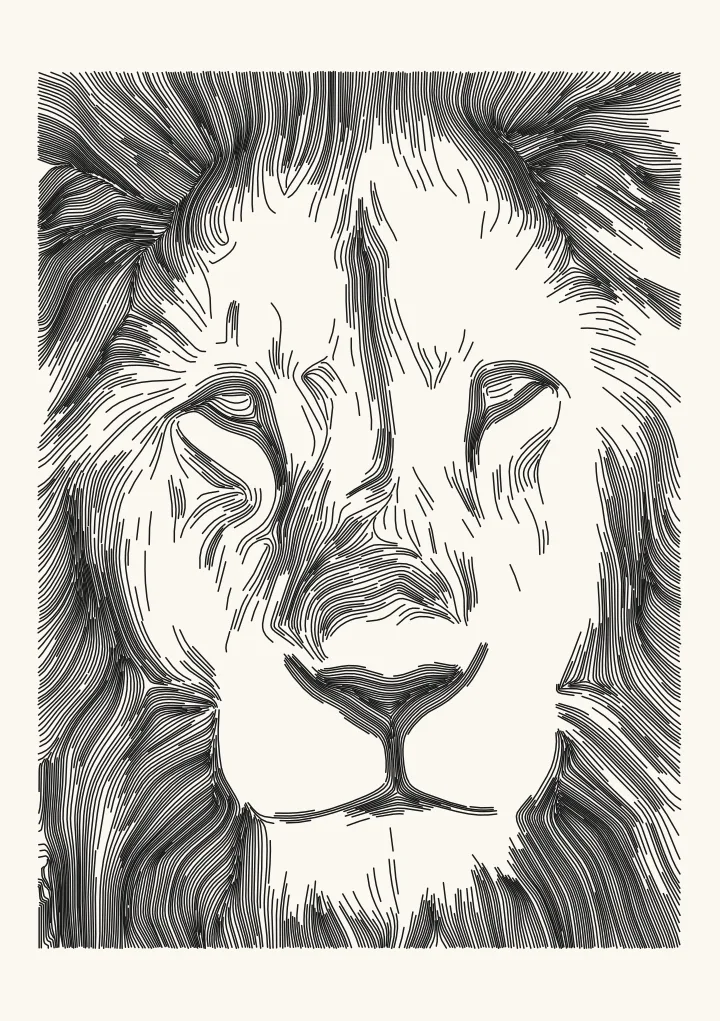

Sample render. Slide to compare the photo with the result.
To plot a photograph, convert it to lines whose density follows the tone: hatching, flow-field lines, stipple dots or a single wandering line. Choose a style, set the line spacing to your pen’s width in millimetres, calibrate the tone curve to the pen, sort the paths so the pen spends its time drawing rather than travelling, and export an SVG in millimetres with one layer per pen. Plotcaster does all of this in the browser and exports files that AxiDraw, NextDraw, saxi, Inkscape and vpype accept without repair.
Why dots are the wrong unit for a pen
Dithering answers “which pixels are black”. A pen does not draw pixels. Each isolated dot is a pen-down, a tiny mark, a pen-up and a travel to the next dot, and a 300 DPI Floyd–Steinberg dither of a postcard-sized image is 300,000 of them. The plot takes hours, the paper dents, and the result looks like a fax anyway, because a pen dot is round and larger than the pixel it stands for.
Lines are what pens are for. A single stroke covers hundreds of pixels’ worth of tone in one continuous movement, the pen stays down, and the mark looks like drawing. Every style below converts tone into line density instead of dot density, and the dither styles that remain are adjusted for the pen: dither merges horizontal runs of black cells into one stroke, and stipple either spaces dots at a pen-sized pitch or joins them into one line.
The styles, and what each is good for
| Style | What the pen does | Tone from | Pen lifts | Character | Best subjects |
|---|---|---|---|---|---|
| Flow | Long lines that follow the image structure, packed tighter in shadow | Line spacing | Few | Engraved, drawn | Portraits, figures, fabric |
| Hatch | Parallel lines that join in as the picture darkens, extra angles in deeper shadow | Lines joining in, then passes | Medium | Pen-and-ink | Architecture, still life |
| Engrave | Lines at a steady pitch that swell to points in shadow, dash toward the lights and cross into lozenges in the darkest areas | Line width, dashes and crossing | Many in the lights | Copperplate, banknote | Portraits, busts, pets |
| Stipple | Dots at a pitch, or one line through all of them | Dot density | Many, or one | Pointillist, or scribble | Skin, fur, soft tone |
| Edges | Single-stroke outlines from an XDoG edge detector, no doubled lines | None (line art) | Medium | Ink sketch | Line drawings, combined with a tone style |
| Squiggle, spiral, rings | A wave that grows taller, then tighter, with tone along rows or one spiral; or smooth rings that crowd together where it is dark | Wave height and frequency; ring spacing | One per line; more for rings | Retro, mechanical | Faces, logos |
| Dither | One mark per black cell, runs merged | Cell density | Many | Halftone | Anything, at a cost in time |
For most photographs the choice is between flow (the least mechanical), hatch (the most traditional) and stipple (the softest). The rest are effects, and good ones.
How the flow style works
The flow style is the image-to-hatching look that most people picture when they think of a plotted portrait. Under the hood:
- Compute the local orientation of the image: the direction along which brightness changes least, at every pixel. This is the structure tensor, smoothed over a radius (the Flow smoothness control, 2.5 mm by default). Hair, cheeks and folds of cloth all produce coherent directions; flat areas produce a gentle field that is carried in from their edges.
- Grow streamlines through that field, starting new lines only where existing lines are further apart than the local tone allows. In shadow the target spacing is small (Spacing in shadows, 0.7 mm by default); in light it is large (Spacing in lights, 5 mm). Tones lighter than Keep highlights blank (12% by default) get no lines at all, so paper stays paper.
- Stop each line when it runs into another one or leaves the region where lines are wanted. Because lines start and stop by spacing rather than by a grid, they are long, and the pen lifts rarely.
The result is a drawing in which every stroke is aligned with the form, dense where the image is dark, and absent where it is light. It is the same logic an engraver uses on a banknote, and the engrave style takes it one step further by keeping the pitch constant, swelling each line to a sharp point in the shadows and crossing a second set of lines only where one line can’t carry the dark.
Set spacing to the pen
The single most important number in a plot is the ratio of line spacing to pen width.
- Spacing equal to the pen width gives solid black in the shadows. Fibre-tip and gel pens bleed, so use 1.1–1.2× the nominal width.
- Spacing at twice the pen width gives a 50% tone that still reads as lines.
- Spacing beyond about 6× the pen width stops reading as tone and starts reading as separate lines.
Typical values: a 0.3 mm fineliner wants 0.35–0.4 mm in the shadows and 2–3 mm in the lights; a 0.5 mm gel pen 0.6 mm and 4 mm; a 1 mm brush pen 1.2 mm and 6 mm. Plotcaster’s spacing controls are in millimetres for this reason, and the preview draws strokes at their real width on a real paper size (A6 to A2, US Letter, Tabloid or a 200 mm square) so you can judge it before plotting.
Calibrate tone to the pen, not to the screen
A photo’s mid-grey is a perceptual value; ink coverage is physical. Lines at 50% coverage on paper look darker than 50% grey on screen, and ink spread (dot gain, or line gain here) makes them darker still. Two controls fix it. The Tone matching select (Perceptual or Linear, under Photo > Expert) decides whether spacing tracks the file’s values or the light they represent; Linear is the honest one for print. Each style’s Tone curve slider (1.0 by default; above 1 lightens mid-tones) is where you compensate for a particular pen on a particular paper. Plot a ten-step strip once per pen, look at which step matches a 50% grey card, and set the curve so that it does. The laser engraving guide covers the same calibration for burn spread.
Optimise the paths
A converted image is a list of thousands of short paths in whatever order the algorithm produced them. Plotted in that order, the pen spends most of the job in the air. Optimisation is not optional:
- Sort paths nearest-neighbour, allowing each to be reversed, so the next path starts where the last one ended.
- Merge paths whose endpoints are within a fraction of the pen width; two strokes become one and a lift disappears.
- Simplify with a tolerance below the pen width, which cuts file size without changing the mark.
- Drop segments shorter than the pen can render, typically under 0.3 mm, which are dents rather than marks.
On a flow-style portrait at A4 these steps commonly cut pen-up travel by 80–90% and plot time by half. Plotcaster shows the line count and the estimated plot time as you change settings, so you can see what each step buys. If you already use vpype, its linesort and linemerge commands do the same job on the exported file.
Export conventions that plot first time
A surprising amount of plotter frustration is the SVG, not the drawing. The rules the file must follow:
- Millimetres.
width="210mm" height="297mm" viewBox="0 0 210 297", so one user unit is one millimetre and nothing needs rescaling in Inkscape or saxi. - Strokes only.
fill="none", a stroke width, no filled shapes, no text, no<use>, no transforms. Plotter drivers follow the path outline; a filled rectangle plots as a box. - Paths, not thousands of
<line>elements. Merged polylines keep files small and drivers responsive. - One top-level group per pen, named the way AxiDraw’s layer control reads it:
1 Black,2 Red, with the optional+S,+H,+Dspeed and height suffixes and a leading!to pause. Inkscape’s layer mode and AxiDraw’s “Plot layers” both key off these names. - A stroke colour per layer, so LightBurn and saxi can split settings automatically if the same file goes to a laser or a multi-pen plot.
Plotcaster writes exactly this, as one file or as one SVG per layer. It can also export a 1-bit PNG at 50 to 1,200 DPI, which is what a laser or thermal printer wants instead.
Multi-pen and colour
Pick up to three inks and Plotcaster splits the picture between them: each ink gets its own set of lines in its own layer, and the layers overprint like a riso print. Plot light colours first. Registration, not the algorithm, is what limits multi-pen quality, so tape the paper down and do not move the pen holder between layers.
A workflow that works
- Choose the paper size and margin. The picture is fitted inside the margins; crop it in a photo editor first if you want a different shape.
- Pick flow for a portrait, hatch for a building, stipple for something soft.
- Set shadow spacing to 1.2× the pen width and light spacing to 6–8× it. Raise Keep highlights blank until the background clears.
- Set Tone matching to Linear (Photo > Expert); adjust Tone curve if you have calibrated the pen.
- Leave path sorting and joining on, and check the time estimate.
- Export SVG in millimetres with the AxiDraw layer name, open it in the plotter driver, and plot.
The whole process runs in the browser with nothing uploaded, and every setting is saved in the page link, so a plot can be reproduced or shared. The link carries the settings, not the photo.
Try it
Drop a photo into the Flow style, set the spacing to your pen, and watch the preview redraw on real paper. Switch to engrave or stipple to compare. For a pure halftone look, the blue noise dither with dots at the pen’s pitch is the cleanest of the dot styles; the blue-noise guide explains why.
FAQ
What is the best way to convert a photo for a pen plotter? For a portrait, a flow-field style with spacing set to the pen width. For architecture, hatching. For a soft, pointillist look, weighted stippling. Dithering to dots works but is slow to plot and looks mechanical.
What line spacing should I use for an AxiDraw? About 1.2× your pen’s line width in the darkest areas and 6–8× in the lightest. For a 0.3 mm fineliner: 0.35 mm and 2.5 mm.
Why does my plotted image look darker than the preview? Ink spread and the perceptual-versus-linear mismatch. Set Tone matching to Linear and raise Tone curve until a plotted grey strip matches a grey card.
How do I get one line per pen in the SVG?
Export with a layer per pen, named 1 Black, 2 Red and so on. AxiDraw’s layer control and Inkscape’s layers both read those names.
Do I still need vpype?
Not for sorting, merging or simplifying; those are built in. vpype remains useful for batch scripting and for its occult and gwrite plugins.
Can the same SVG go to a laser cutter? Yes. Set the spacing to at least the kerf, import into LightBurn as vectors, and use a Line layer. The stroke colours split the layers automatically.