What is dithering? Definition, examples and how it works
Dithering turns a few colours into the illusion of many by arranging dots. What it is, why it works, the main algorithms, and where it is used today.
Updated
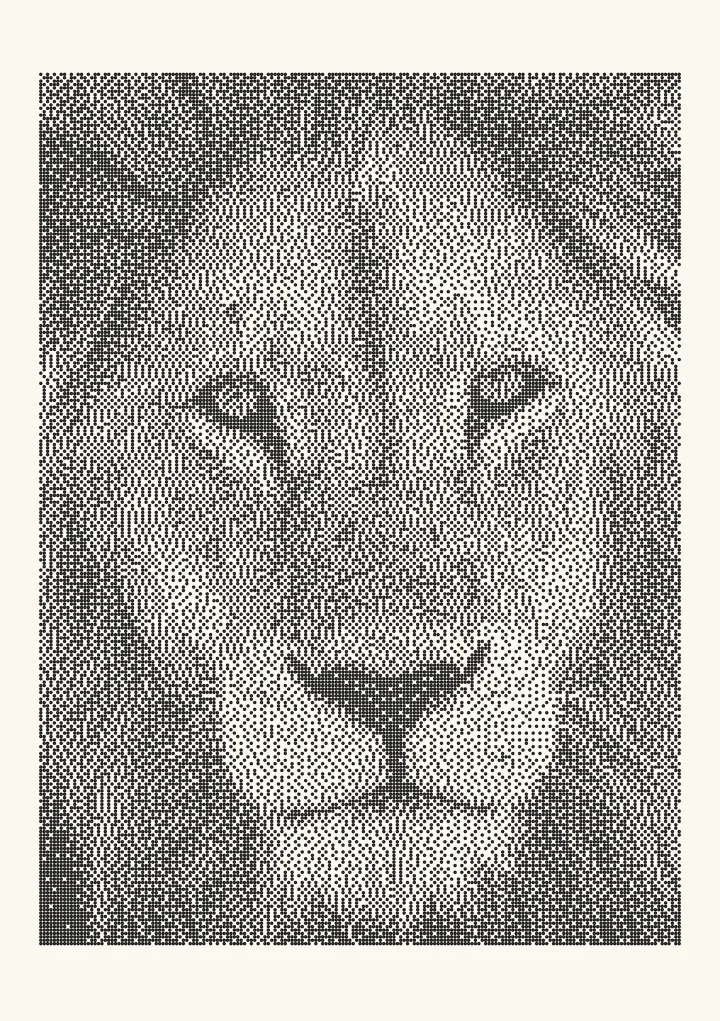

Sample render. Slide to compare the photo with the result. Try the algorithm live below.
Rendered in 0.0 ms on your machine. Every dot here is what a pen or laser would put down.
Dithering is the deliberate use of noise or patterns to make a small set of colours or levels look like a larger one. In an image it means placing black and white dots so that, at a normal viewing distance, your eye averages them into grey. The word is the same in audio, where a little noise is added before rounding a signal to fewer bits. This page is about images; audio gets one section below.
Dithering in one sentence
A 1-bit image can only hold black or white. Dithering decides, pixel by pixel, which of the two to use so that the density of black matches the brightness of the original. Fifty percent grey becomes a field that is half black dots; twenty percent grey becomes one that is one-fifth black. The individual dots are the price; the tone is the prize.
You can see the effect on your own photo in the Plotcaster app. It runs in the browser, nothing is uploaded, and you can flip between sixteen algorithms with the same image loaded.
Why it works: your eye is a low-pass filter
The retina cannot resolve detail finer than about one arc-minute, and the visual system averages over anything smaller. A 300 DPI print viewed at 30 cm puts roughly 3.5 dots into one arc-minute, so single dots vanish and only their average survives. That average is the grey. Dithering exploits the same limit that makes newspaper halftones, cross-hatched engravings and pointillist paintings read as continuous tone.
The consequence is that dithering has a viewing distance. Zoom in and the dots reappear. Every choice about which algorithm to use is really a choice about what the dots look like when you do get close: a grid, a grain, or a swirl.
Where the word comes from
Mechanical bomb-sight and fire-control computers in the 1940s worked better in a vibrating aircraft than on a bench, because the vibration stopped gears and bearings from sticking. Engineers added small motors to shake them on purpose and called the shaking “dither”, from the Middle English didderen, to tremble. Lawrence G. Roberts applied the idea to pictures in his 1961 MIT thesis, adding noise before quantising to remove banding, and the term was in its modern signal-processing sense by 1964.
Dithering vs no dithering
Without dithering, reducing an image to two levels is a threshold: everything above 50% brightness becomes white, everything below becomes black. Faces turn into silhouettes and skies into flat slabs. Reducing to 16 or 256 colours without dithering produces banding, visible steps in what should be a smooth gradient.
| Levels available | No dither | With dither |
|---|---|---|
| 2 (1-bit) | Silhouettes, no mid-tones | Full tonal range as dot density |
| 4 (2-bit) | Four flat bands | Smooth gradients, visible grain |
| 16 (4-bit) | Obvious steps in skies and skin | Steps disappear |
| 256 (8-bit, GIF) | Faint banding in gradients | Invisible at normal size |
Compare a plain threshold against Floyd–Steinberg on the compare page and the difference needs no explanation.
The three families of image dithering
Every dithering algorithm answers the same question, “should this pixel be black or white?”, but they answer it in three different ways.
Threshold and random dither. Compare the pixel to a fixed value (no dithering) or to a random number (white-noise dither). Random dither works in principle but looks like television static, because white noise has energy at every frequency, including the low ones your eye sees as blotches.
Ordered dithering. Compare the pixel to a value from a small tiled pattern. The classic pattern is the Bayer matrix (Bayer, 1973): a 4×4 matrix gives 17 distinguishable tones, an 8×8 gives 65, a 16×16 gives 257. Ordered dithering is fast, parallel and stable across animation frames, and it produces a visible crosshatch grid. Blue-noise masks are the modern variant: the same one-comparison-per-pixel method with a pattern that has no grid. See Bayer 8×8 and blue noise, or read the blue-noise guide.
Error diffusion. Quantise the pixel, measure how wrong that was, and push the error onto pixels that have not been processed yet. Floyd and Steinberg published the first version in 1976; Jarvis, Judice and Ninke, Stucki, Burkes, Sierra and Bill Atkinson each changed the weights. Error diffusion gives the most accurate tone of the three families and the least visible structure, at the cost of being sequential and prone to “worm” artifacts in flat areas. Ostromoukhov (2001) and Zhou and Fang (2003) fixed most of the worms by varying the weights with intensity. Start with Floyd–Steinberg; the full line-up is in Dithering algorithms compared.
| Family | Per-pixel cost | Parallel | Tone accuracy | Texture | Typical use |
|---|---|---|---|---|---|
| Threshold | 1 compare | Yes | None | Flat | Stencils, baseline |
| Ordered (Bayer) | 1 compare + lookup | Yes | Good | Grid | Pixel art, GPUs, animation |
| Ordered (blue noise) | 1 compare + lookup | Yes | Good | Even grain | Games, e-ink, plotters |
| Error diffusion | 4–12 multiply-adds | No | Best | Organic, worms | Photos, print, GIF |
The gamma trap
Most dithering tools get the tone wrong, and the reason is that image files store brightness in a perceptual (sRGB) scale rather than in physical light. A pixel value of 128 out of 255 looks like mid-grey on screen, but it only emits about 21% of the light of white. If you dither it to 50% dot coverage, the result reflects 50% of the light and is far too bright.
The correct order is: convert to linear light, dither, and then the paper or screen does the rest. A 50% linear coverage corresponds to a perceptual value of about 188 out of 255. Plotcaster offers both as Tone matching (Perceptual or Linear) and adds an Ink spread correction on top, because ink and burn marks spread and make real dots larger than the ones you asked for.
Dithering in audio, briefly
Audio dithering is the same idea in one dimension. When a 24-bit master is reduced to 16 bits for CD, the rounding error correlates with the music and sounds like distortion. Adding a little noise before rounding, usually with a triangular probability distribution, turns that distortion into a steady, quiet hiss that the ear tolerates far better. If that is the dithering you were looking for, the rest of this page will not help you, but the principle is identical: trade a structured error for an unstructured one.
Where dithering is used today
- GIF and indexed PNG. Any conversion to a 256-colour palette dithers by default; Floyd–Steinberg is the usual choice.
- E-ink and 1-bit displays. Kindles, badges and the original Macintosh (512×342, black and white) rely on it entirely. Atkinson dithering was written for that screen.
- Thermal and dot-matrix printers. Receipt printers are 1-bit devices; every photo on a receipt is dithered.
- Laser engravers. Most materials either mark or do not; the engraver fires a dithered bitmap. See Dithering for laser engraving.
- Pen plotters. Each black cell becomes a pen mark, so the dither pattern is literally drawn. See Image to pen plotter lines.
- Games and 3D rendering. Blue-noise dithering hides banding in fog, shadows and gradients, and Lucas Pope’s Return of the Obra Dinn (2018) rendered an entire 3D game in 1-bit.
- Pixel art and retro design. Hand-placed dither patterns are a core technique; see Dithering in pixel art.
- Riso and screen printing. Each ink layer is a 1-bit stencil, so photos have to be dithered or halftoned per colour.
Try it on your image
Drop a photo into Plotcaster, pick an algorithm from the list, and switch Tone matching (Photo > Expert) between Perceptual and Linear to see the gamma effect for yourself. Export a 1-bit PNG at 50 to 1,200 DPI, or an SVG in millimetres with each dot as a pen mark. Nothing leaves your browser.
FAQ
Is dithering the same as halftoning? Halftoning is the older printing term and usually means clustered dots of varying size on a regular screen. Dithering usually means dispersed single pixels. Both convert continuous tone to two levels; both are covered by the same maths, and Bayer’s 1973 paper called its output a halftone.
Does dithering add noise to a photo? Yes, on purpose. The noise replaces something worse: banding or posterisation. A well-chosen algorithm puts the noise at frequencies your eye cannot see at normal viewing distance.
Does dithering make files bigger? Usually. Dithered pixels compress poorly because the pattern is high-frequency. A dithered GIF is often two to three times the size of the same image posterised without dither.
Which dithering algorithm is best? For photographs on screen, Floyd–Steinberg or Ostromoukhov. For animation, pixel art and GPUs, ordered dithering with Bayer or blue noise. For pens and lasers, blue noise or Ostromoukhov, in linear light with dot-gain compensation. The comparison guide goes through the trade-offs with numbers.
Should I turn dithering on or off in a game’s settings? On, unless you see shimmering. Games use it to hide banding in gradients and to fade objects in and out without transparency sorting. Turning it off saves nothing measurable.
Can dithering be reversed? Not exactly. Blurring a dithered image recovers an approximation of the original tone, which is what your eye is doing anyway, but the fine detail that was traded for the dots is gone.