Floyd–Steinberg dithering explained, with code
How Floyd–Steinberg works: the 7/16, 3/16, 5/16, 1/16 kernel, serpentine scanning, working code, its artifacts, and when to pick something else.
Updated
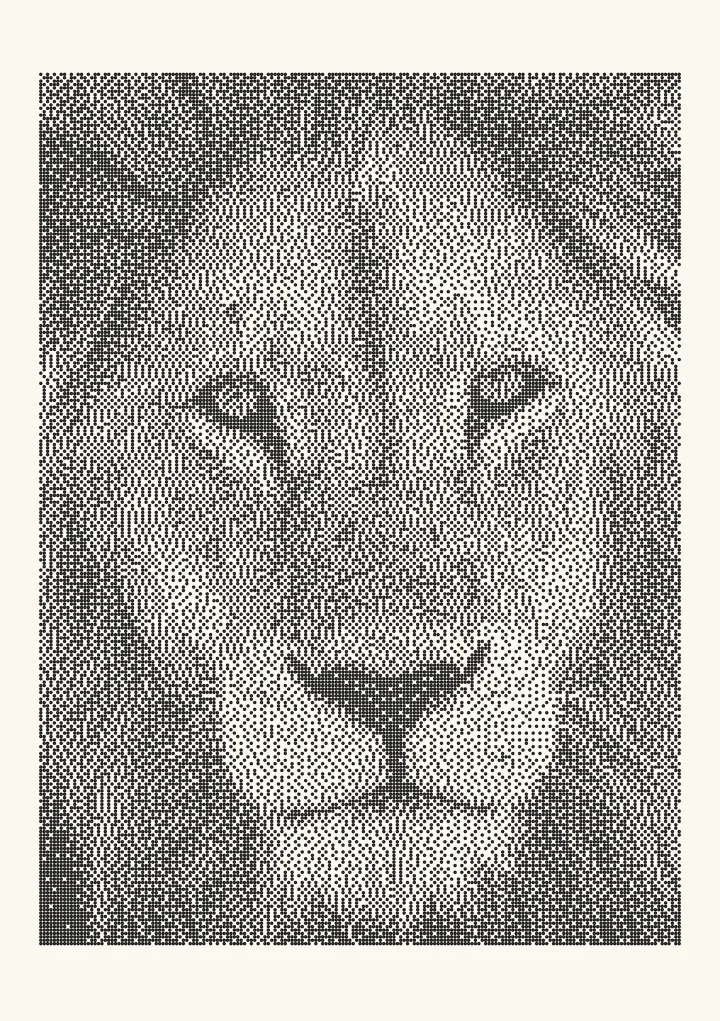

Sample render. Slide to compare the photo with the result. Try the algorithm live below.
Rendered in 0.0 ms on your machine. Every dot here is what a pen or laser would put down.
Floyd–Steinberg dithering converts a greyscale image to black and white by rounding each pixel and then spreading the rounding error over four neighbours in the proportions 7/16, 3/16, 5/16 and 1/16. Robert W. Floyd and Louis Steinberg published it in 1976, and fifty years later it is still the default error-diffusion algorithm in almost every image library. Here is how it works, why the weights are what they are, and where it falls down.
Run Floyd–Steinberg on your own image.
The kernel
Process pixels left to right, top to bottom. For each pixel, pick the nearer of black or white, compute error = original − chosen, and add fractions of that error to the pixels that have not been visited yet:
          #   7/16
  3/16  5/16  1/16
# is the current pixel. The pixel to its right gets 7/16 of the error; the three pixels on the row below get 3/16, 5/16 and 1/16. The fractions sum to 1, so no error is lost: the average brightness of the output matches the input to within a rounding error per row.
A worked example
Take a row of pixels all at 25% grey (64 out of 255) and a threshold of 128.
- Pixel 1 is 64. Below 128, so it becomes black (0). Error = 64. Its right neighbour receives 64 × 7/16 = 28; the three pixels below receive 12, 20 and 4.
- Pixel 2 was 64 and is now 64 + 28 = 92. Still black. Error = 92. The next pixel receives 92 × 7/16 ≈ 40.
- Pixel 3 is 104. Black. Next pixel receives 46.
- Pixel 4 is 110. Black. Next receives 48.
- Pixel 5 is 112. Black; next receives 49; pixel 6 is 113, and the accumulation continues until a pixel crosses 128 and flips to white, which sends a large negative error forward and resets the cycle.
Over the row, about one pixel in four is white, which is exactly 25% coverage. The row below starts with the error it inherited, so the white pixels do not line up vertically. That is the whole algorithm.
Working code
A minimal JavaScript implementation on a Float32Array of greyscale values in the range 0–1:
function floydSteinberg(gray, width, height, serpentine = true) {
  const out = new Uint8Array(width * height);
  const buf = Float32Array.from(gray); // working copy, errors accumulate here
  for (let y = 0; y < height; y++) {
    const ltr = !serpentine || y % 2 === 0;
    for (let i = 0; i < width; i++) {
      const x = ltr ? i : width - 1 - i;
      const dir = ltr ? 1 : -1;
      const idx = y * width + x;
      const old = buf[idx];
      const val = old < 0.5 ? 0 : 1;
      out[idx] = val;
      const err = old - val;
      if (x + dir >= 0 && x + dir < width) buf[idx + dir] += err * 7 / 16;
      if (y + 1 < height) {
        const below = idx + width;
        if (x - dir >= 0 && x - dir < width) buf[below - dir] += err * 3 / 16;
        buf[below] += err * 5 / 16;
        if (x + dir >= 0 && x + dir < width) buf[below + dir] += err * 1 / 16;
      }
    }
  }
  return out;
}
The same thing in Python with NumPy, without serpentine for brevity:
import numpy as np

def floyd_steinberg(img):            # img: 2-D float array, 0..1
    h, w = img.shape
    buf = img.astype(np.float32).copy()
    out = np.zeros((h, w), dtype=np.uint8)
    for y in range(h):
        for x in range(w):
            old = buf[y, x]
            new = 1 if old >= 0.5 else 0
            out[y, x] = new
            err = old - new
            if x + 1 < w:           buf[y, x + 1]     += err * 7 / 16
            if y + 1 < h:
                if x > 0:           buf[y + 1, x - 1] += err * 3 / 16
                buf[y + 1, x]                         += err * 5 / 16
                if x + 1 < w:       buf[y + 1, x + 1] += err * 1 / 16
    return out
Two implementation details matter more than they look. First, the working buffer must be floating point or at least wider than 8 bits, because accumulated error can push a value below 0 or above 255. Second, the divisor of 16 is a power of two, which is why the original ran acceptably on 1976 hardware: the multiplications are shifts.
Why 7, 3, 5 and 1
Floyd and Steinberg chose the weights by experiment with one explicit goal: a region of exactly 50% grey should come out as a perfect checkerboard. With these four weights it does. Larger weights to the right produce horizontal streaks; larger weights below produce vertical ones; the 7/3/5/1 split balances the two and gives the finest possible texture from a four-pixel kernel.
The paper is R. W. Floyd and L. Steinberg, “An adaptive algorithm for spatial greyscale”, Proceedings of the Society for Information Display 17(2), 75–77, 1976. It is two pages long.
Serpentine scanning
Because the error always flows right and down, flat regions develop diagonal “worms”: chains of dots that drift in the same direction across the image. Reversing the scan direction on every other row (serpentine, or boustrophedon, scanning) sends the error the other way on alternate rows and breaks the worms into shorter, less visible pieces. Every serious implementation does this; Plotcaster has it on by default and exposes it as a toggle so you can see the difference.
Artifacts to expect
- Worms in flat, light areas, even with serpentine scanning.
- Checkerboard patches at 1/2, 1/3 and 1/4 grey, where the diffusion settles into a stable cycle. On a smooth gradient you see these as sudden bands of regular texture.
- Sharpening. Error diffusion is a high-pass process, so edges come out slightly harder than in the source. Text looks crisper; skin looks harsher.
- Start-up transient. The first pixels of each row carry no inherited error, so the left edge (or both edges, with serpentine) can look slightly different.
None of these are visible in a photograph shown at screen resolution, which is why the algorithm survived. They are visible in a 2 mm plotter dot or a laser burn, which is why the print world moved on.
Floyd–Steinberg vs the alternatives
| Floyd–Steinberg | Atkinson | Jarvis–Judice–Ninke | Ostromoukhov | |
|---|---|---|---|---|
| Neighbours | 4 | 6 | 12 | 3 |
| Error kept | 100% | 75% | 100% | 100% |
| Rows ahead | 1 | 2 | 2 | 1 |
| Texture | Fine | Crisp, contrasty | Soft | Blue-noise-like |
| Worms | Some | Some | Fewer | None |
| Tone accuracy | Good | Poor at extremes | Good | Good |
| Relative speed | 1× | 1× | 0.4× | 1.1× |
Atkinson is the retro choice; its history and kernel are in the Atkinson guide. Jarvis is smoother but blurs. Ostromoukhov is Floyd–Steinberg with the weights re-tuned per grey level so that every tone dithers to blue noise; it is what to use when you want error diffusion without worms. The full sixteen are laid out in Dithering algorithms compared.
Gamma: the mistake almost every implementation makes
If you feed sRGB pixel values straight into the code above, mid-tones come out too light on paper and too dark on screen relative to the source. A pixel value of 0.5 in sRGB is about 0.21 in linear light; dithering it to 50% coverage produces a patch that reflects 50%. Convert to linear before dithering (c <= 0.04045 ? c/12.92 : ((c+0.055)/1.055)^2.4), and, for ink or burn marks, apply a dot-gain curve so that the spread of real dots does not darken the result. Plotcaster does both; the perceptual/linear toggle shows the size of the effect.
Floyd–Steinberg on plotters and lasers
Every black pixel becomes a mark, so worms become visible streaks and checkerboard patches become visible tiles. Three fixes, in order of effort: turn on serpentine scanning, switch to Ostromoukhov or Zhou–Fang, or move to a blue-noise ordered dither. For lasers, Jarvis is the usual recommendation in LightBurn’s documentation; the laser engraving guide covers DPI, spot size and dot gain. For pens, the plotter guide explains why lines often beat dots.
Try it
Load a photo with Floyd–Steinberg, toggle Serpentine scan, switch Tone matching between Perceptual and Linear, and export a 1-bit PNG at the DPI you need or an SVG with one pen mark per dot.
FAQ
Is Floyd–Steinberg the best dithering algorithm? It is the best-known and a fine default for screens. For print, plots and engraving, Ostromoukhov, Zhou–Fang or blue noise produce cleaner results.
Does Floyd–Steinberg work in colour? Yes. Run it per channel for RGB output, or, for a fixed palette, pick the nearest palette colour and diffuse the three-channel error vector. GIF encoders do the latter.
Why does my Floyd–Steinberg output have diagonal lines? Those are worms. Enable serpentine scanning; if they persist, the flat area is near 1/3 or 1/4 grey where the algorithm cycles. Ostromoukhov fixes it.
Can Floyd–Steinberg run on a GPU? Not directly; each pixel depends on the previous one. Wavefront and block-parallel approximations exist, but for real-time work use an ordered dither such as blue noise instead.
What threshold should I use? 0.5 in linear light. Changing the threshold shifts the whole tone curve; use a tone curve or dot-gain setting to adjust brightness instead, and leave the threshold alone.