Atkinson dithering: the classic Mac algorithm explained
Bill Atkinson's dithering spreads only 3/4 of the error. Why that gives the crisp MacPaint look, the kernel, code, and how it compares to Floyd–Steinberg.
Updated
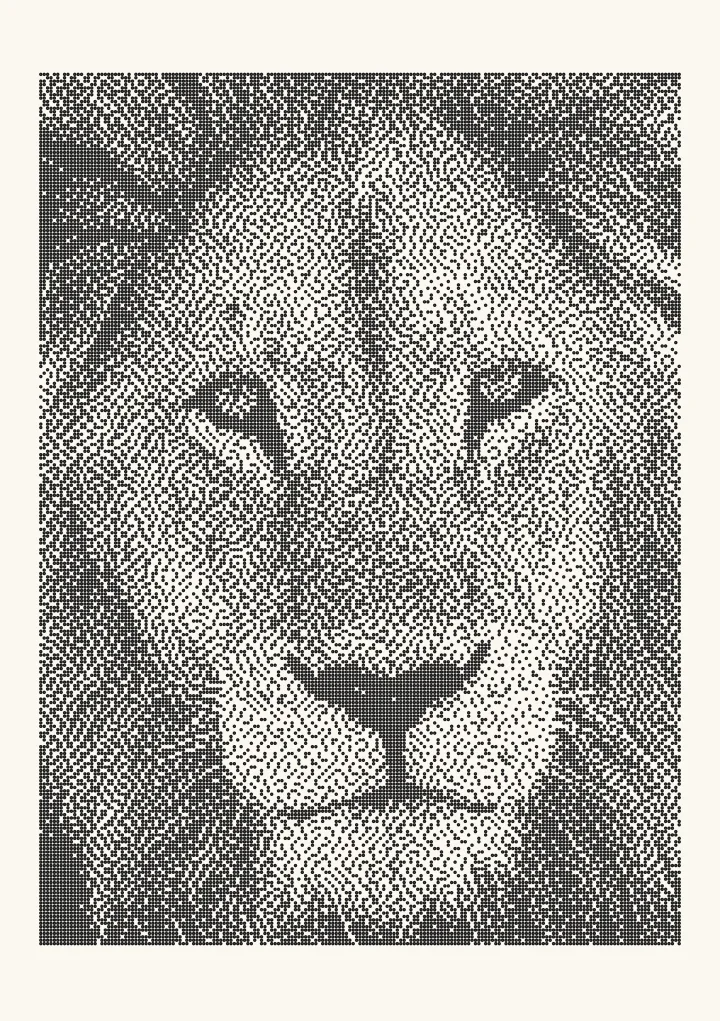

Sample render. Slide to compare the photo with the result. Try the algorithm live below.
Rendered in 0.0 ms on your machine. Every dot here is what a pen or laser would put down.
Atkinson dithering is an error-diffusion algorithm that spreads only three-quarters of each pixel’s rounding error, in six equal shares of 1/8, to neighbours to the right and below. Bill Atkinson wrote it at Apple for the original Macintosh’s 512×342 black-and-white screen, and it is the reason MacPaint and HyperCard images have their crisp, high-contrast, slightly blown-out look. This page gives the kernel, the code, the history, and an honest account of what the algorithm gets wrong.
Try Atkinson dithering on your own image.
Who Bill Atkinson was
Bill Atkinson (1951–2025) was Apple employee number 51. He wrote QuickDraw, the graphics library beneath the Lisa and Macintosh interfaces, independently rediscovered the midpoint circle algorithm to draw circles fast on a 68000, wrote MacPaint, and conceived and built HyperCard. The 1984 Macintosh could show exactly two colours, so every scanned photograph, every clip-art image and every HyperCard stack that contained a picture went through his dithering routine. Ask anyone who used a Mac before 1990 what a computer photograph looked like and they will describe Atkinson dithering.
The algorithm was never published as a paper. It survived in Apple’s code and in memory, and in 2003 Atkinson shared the original routine with John Balestrieri of Tinrocket, who built it into the Mac application HyperDither. That is the provenance of most modern implementations.
The kernel
        #   1/8  1/8
  1/8  1/8  1/8
       1/8
The current pixel is #. Two pixels to the right, three on the next row (left, centre, right) and one two rows down each receive one-eighth of the error. Six neighbours times 1/8 is 6/8: a quarter of the error is thrown away.
Compare Floyd–Steinberg, which sends 7/16, 3/16, 5/16 and 1/16 to four neighbours and keeps all of it.
Why it looks the way it does
Discarding a quarter of the error has two consequences, and both are visible in every Atkinson image.
Higher local contrast. Error diffusion is a feedback loop that fights to keep the average tone right. Weaken the feedback and the loop gives up sooner: light areas stay lighter, dark areas darker, and edges pop. The image reads as sharper and more graphic than a Floyd–Steinberg version of the same source.
Blown highlights and blocked shadows. In a region at 5% grey, the algorithm should place one black dot in twenty pixels. Floyd–Steinberg carries the debt until a dot is forced. Atkinson lets the debt leak, so it may never place the dot, and the region goes pure white. The same happens near black. Where Floyd–Steinberg holds detail in the last 10% at either end of the scale, Atkinson gives you paper and ink.
On a 72 DPI monochrome screen in 1984 this was the right trade. Fewer dots in the highlights made faces cleaner, and the sharpening made a 512-pixel-wide picture look like it contained more detail than it did. On a modern high-resolution display or a print, the lost tone is more noticeable, which is why the algorithm is chosen today for its look rather than its accuracy.
Code
function atkinson(gray, width, height) {   // gray: Float32Array, 0..1
  const out = new Uint8Array(width * height);
  const buf = Float32Array.from(gray);
  const add = (x, y, v) => {
    if (x >= 0 && x < width && y < height) buf[y * width + x] += v;
  };
  for (let y = 0; y < height; y++) {
    for (let x = 0; x < width; x++) {
      const i = y * width + x;
      const old = buf[i];
      const val = old < 0.5 ? 0 : 1;
      out[i] = val;
      const e = (old - val) / 8;         // one eighth; six shares = 3/4 of the error
      add(x + 1, y, e);  add(x + 2, y, e);
      add(x - 1, y + 1, e);  add(x, y + 1, e);  add(x + 1, y + 1, e);
      add(x, y + 2, e);
    }
  }
  return out;
}
The kernel reaches two pixels right and two rows down, so an implementation with a rolling buffer needs three rows, not two. On a 68000 the divide-by-eight was a three-bit shift, which is not a coincidence.
Atkinson vs Floyd–Steinberg
| Atkinson | Floyd–Steinberg | |
|---|---|---|
| Neighbours | 6 | 4 |
| Share per neighbour | 1/8 each | 7/16, 3/16, 5/16, 1/16 |
| Error preserved | 75% | 100% |
| Rows ahead | 2 | 1 |
| Mid-tone accuracy | Good | Good |
| Highlight and shadow accuracy | Poor: goes to solid white or black | Good |
| Contrast | High | Neutral |
| Sharpness | Higher | Slightly sharpened |
| Worms | Yes, softer | Yes |
| Ink coverage on a print | Less | More |
| Speed | Same | Same |
Put the two side by side on the compare page with a portrait. Floyd–Steinberg keeps the gradient across a forehead; Atkinson turns it to white and draws the eyebrow harder.
When to use it
- The retro Mac look. It is the correct algorithm for anything meant to evoke MacPaint, HyperCard, early desktop publishing, or 1-bit games in that tradition.
- Line art and high-key subjects. Product shots on white, ink drawings, typography: the blown highlights cost nothing and the sharpening helps.
- Fast plots and engraves. Fewer dots is fewer pen strokes and fewer laser pulses. A plotter drawing with Atkinson dots typically has 15–30% fewer marks than the Floyd–Steinberg version of the same image, and finishes proportionally sooner. See Image to pen plotter lines.
- Small displays. E-paper badges and 1-bit LCDs at low resolution benefit from the same trade the 1984 Mac did.
When not to use it: photographs where highlight or shadow detail matters, anything you will judge by tonal accuracy, and smooth gradients, where the leak produces visible steps.
The accuracy criticism, and the fix
The common complaint, “Atkinson looks cool but is not accurate”, is correct. The fix is not to abandon the algorithm but to correct the tone before it runs. Apply a curve that darkens highlights and lightens shadows slightly, so that the regions Atkinson would blow out still contain enough error to force a dot. In Plotcaster, set Tone matching to Linear (Photo > Expert), then lower Contrast or add a little Ink spread until the brightest and darkest areas keep a few dots. Ten seconds of adjustment recovers most of the lost range and keeps the look.
If you want the crisp, contrasty texture with correct tone and no tuning, Ostromoukhov is the modern answer: full error diffusion with weights that vary by intensity, so highlights keep their dots without the worms Floyd–Steinberg produces.
HyperDither and other implementations
HyperDither (Tinrocket, macOS) is the reference implementation, with Atkinson’s own code at its core. Evil Mad Scientist Laboratories published a Processing sketch that runs it on live webcam video, which is a good way to see why it appealed: the sharpening makes low-resolution video legible. Nearly every browser dithering tool includes it, usually next to Floyd–Steinberg and Bayer, and it is in the Plotcaster list as atkinson.
Try it
Load a photo with Atkinson dithering, compare it to Floyd–Steinberg, and export a small 1-bit PNG at a low DPI such as 72 for the full early-Macintosh effect. For a plotter, set the dither style cell pitch to your pen width and export SVG.
FAQ
Who invented Atkinson dithering? Bill Atkinson, at Apple, for the original Macintosh in the early 1980s. It was never published as a paper; the code reached the public through HyperDither in the 2000s.
Why does Atkinson dithering lose detail in bright areas? Because it diffuses only 75% of the quantisation error. In near-white regions the accumulated error leaks away before it is large enough to force a black dot, so the region becomes solid white. The same happens near black.
Is Atkinson better than Floyd–Steinberg? It looks sharper and more contrasty; Floyd–Steinberg is more accurate. Neither is better; they optimise different things. For accuracy with Atkinson-like crispness, use Ostromoukhov.
Does Atkinson dithering use serpentine scanning? The original scans left to right on every row. Serpentine scanning works with the kernel and reduces worms; Plotcaster enables it by default.
Can I use Atkinson dithering for laser engraving? Yes, and LightBurn offers it as an image mode. It burns fewer dots, which is faster and gentler on wood, but expect highlights to drop out. Jarvis or Ostromoukhov are safer for photographs; see the laser guide.
What resolution was the original Macintosh screen? 512×342 pixels at roughly 72 DPI, 1-bit. Every image on it was dithered.