Bayer dithering: how ordered dithering and the Bayer matrix work
How Bayer ordered dithering works: the threshold matrix, how 2×2 grows to 16×16, the tones each size gives, printable matrices, code and when to use it.
Published
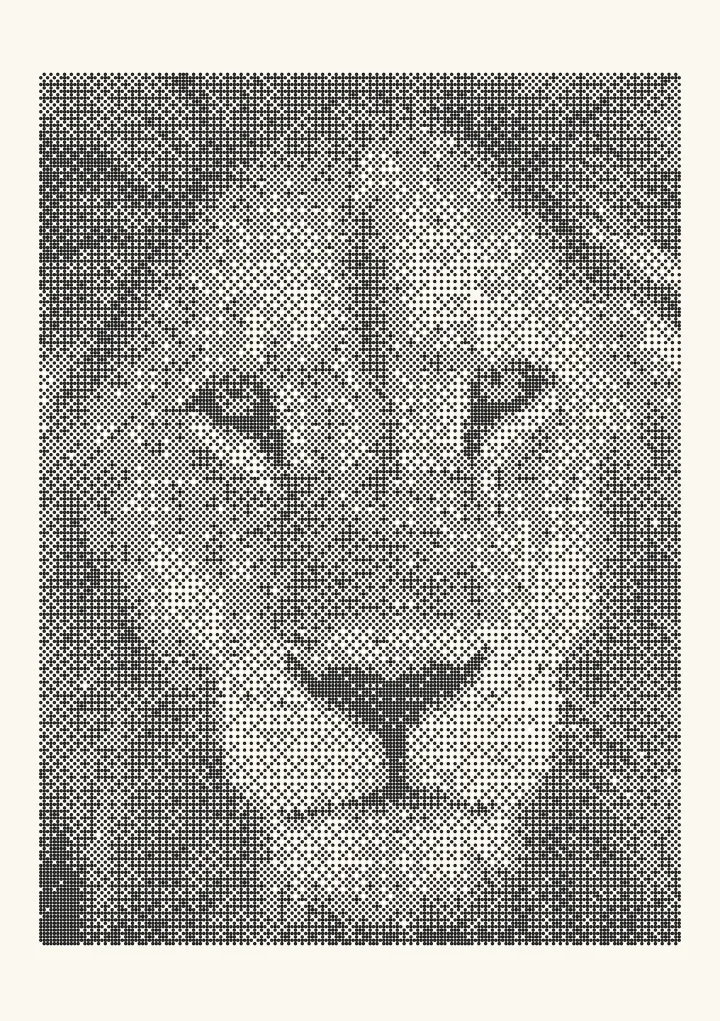

Sample render. Slide to compare the photo with the result. Try the algorithm live below.
Rendered in 0.0 ms on your machine. Every dot here is what a pen or laser would put down.
Bayer dithering is ordered dithering with a Bayer matrix: a small square of threshold values, tiled across the picture, that decides for each pixel whether it becomes ink or paper. A pixel darker than the threshold at its position becomes ink; a lighter one stays paper. The thresholds are spread as evenly as a square grid allows, so a flat grey turns into a tidy, regular pattern, and an n×n matrix can draw n² + 1 tones. It needs no memory of neighbouring pixels, gives the same result every time, and leaves a visible crosshatch grid.
Try Bayer 8×8 dithering on your own image.
What ordered dithering is
Wikipedia’s definition is the right place to start: “Ordered dithering is any image dithering algorithm which uses a pre-set threshold map tiled across an image” (Ordered dithering). The map is fixed before the picture is seen. Every pixel is compared with the map value under it, and that one comparison is the whole algorithm.
The Bayer matrix is the classic map. Bryce Bayer described it in 1973 in “An optimum method for two-level rendition of continuous-tone pictures”, a paper at the IEEE International Conference on Communications. Other maps work the same way: a blue-noise mask is ordered dithering without the grid, and a clustered-dot screen is ordered dithering that grows round spots instead of scattering single dots.
If you want the idea of dithering itself first, see what is dithering.
How the Bayer matrix is built
The matrices are built by nesting. Start from a single 0. Each larger matrix is four copies of the one below it, each multiplied by 4, with 0 added to every entry of the top-left copy, 2 to the top-right, 3 to the bottom-left and 1 to the bottom-right:
B(1)  = [0]
B(2n) = | 4·B(n) + 0   4·B(n) + 2 |
        | 4·B(n) + 3   4·B(n) + 1 |
Wikipedia writes the same recursion with the result scaled by 1 ÷ (2n)². Two steps give the matrices most people mean by “Bayer matrix”:
| 0 | 2 |
| 3 | 1 |
| 0 | 8 | 2 | 10 |
| 12 | 4 | 14 | 6 |
| 3 | 11 | 1 | 9 |
| 15 | 7 | 13 | 5 |
One more step gives the 8×8, which holds every whole number from 0 to 63:
 0  32   8  40   2  34  10  42
48  16  56  24  50  18  58  26
12  44   4  36  14  46   6  38
60  28  52  20  62  30  54  22
 3  35  11  43   1  33   9  41
51  19  59  27  49  17  57  25
15  47   7  39  13  45   5  37
63  31  55  23  61  29  53  21
These are the matrices Plotcaster uses. The 16×16 is one more step of the same rule; the code below builds it.
From matrix values to thresholds
A matrix value v in an n×n matrix becomes a threshold of (v + 0.5) ÷ n². In the 4×4, value 0 gives 0.03125 and value 15 gives 0.96875, so the thresholds are evenly spaced between black and white and never land exactly on either. A pixel whose lightness is below the threshold at its position becomes ink.
A worked example with the 4×4: a pixel of 40% lightness (0.40) sits on the cell holding 8. Its threshold is 8.5 ÷ 16 = 0.53, and 0.40 is below it, so the pixel becomes ink. The pixel next to it, on the cell holding 2, has a threshold of 2.5 ÷ 16 = 0.16, so it stays paper. In Plotcaster the Threshold slider moves every threshold up or down together, which makes the whole picture darker or lighter without changing the pattern.
How many tones each size gives
An n×n tile has n² cells with n² different thresholds. A flat tone can fill 0, 1, 2 and so on up to all n² of them, so the tile can show n² + 1 levels, from bare paper to solid ink.
| Matrix | Tone ramp | Tones |
|---|---|---|
| Bayer 2×2 |  | 5 |
| Bayer 4×4 |  | 17 |
| Bayer 8×8 |  | 65 |
| Bayer 16×16 |  | 257 |
The ramps are Plotcaster’s own output, a smooth grey gradient drawn at two screen pixels per dot. The pattern repeats every n pixels: every 2 pixels for the 2×2, up to every 16 for the 16×16. The 2×2 steps are easy to count. By 8×8 the steps are too fine to see and the grid is what you notice. A 16×16 already has more levels (257) than an 8-bit photo has greys (256), so going bigger buys a finer-looking pattern rather than more tone.
Code
Here is Bayer dithering in plain JavaScript. It builds the matrix with the nesting rule above and makes one comparison per pixel:
// Bayer matrix of size n (a power of two), whole numbers 0 to n² − 1.
function bayerMatrix(n) {
  let m = [[0]];
  for (let size = 1; size < n; size *= 2) {
    const prev = m;
    m = Array.from({ length: size * 2 }, (_, y) =>
      Array.from({ length: size * 2 }, (_, x) =>
        prev[y % size][x % size] * 4 + [0, 2, 3, 1][(y >= size ? 2 : 0) + (x >= size ? 1 : 0)]));
  }
  return m;
}

// gray: lightness per pixel, 0 = black, 1 = white. Returns 1 for ink, 0 for paper.
function bayerDither(gray, width, height, n = 8) {
  const m = bayerMatrix(n);
  const out = new Uint8Array(width * height);
  for (let y = 0; y < height; y++) {
    for (let x = 0; x < width; x++) {
      const threshold = (m[y % n][x % n] + 0.5) / (n * n);
      out[y * width + x] = gray[y * width + x] < threshold ? 1 : 0;
    }
  }
  return out;
}
No pixel reads any other pixel, so the loop can run in any order, split across threads, or run as a GPU shader. The code compares the pixel values as they are. Plotcaster’s Tone matching setting (Photo > Expert) chooses what the comparison works in: Perceptual, the default, which “makes the drawing look like the photo”, or Linear light, which “matches measured ink coverage, which prints darker”.
The four sizes on one photo
Each is the lion’s eyes from the same test render, two screen pixels per dot. The grid gets finer and the tone smoother as the matrix grows:
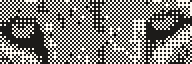
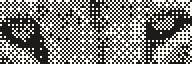
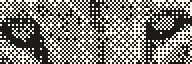
Each size has its own page with the matrix, a full A5 test render and a live demo: Bayer 2×2, Bayer 4×4, Bayer 8×8 and Bayer 16×16.
Bayer vs blue noise vs error diffusion
Wikipedia puts Bayer’s weakness in one line: “With the most common ‘Bayer’ threshold map, the algorithm is characterized by noticeable crosshatch patterns in the result.” The pattern repeats every n pixels, and your eye picks up that repeat as a grid. What you get in return is stability.
| Bayer | Blue noise | Error diffusion | |
|---|---|---|---|
| How a pixel is decided | Its own value against a tiled matrix | Its own value against a tiled noise mask | Its own value plus error passed on from pixels already done |
| Visible texture | Regular crosshatch grid | Even grain, no grid | Organic, with worms in flat areas |
| A change to one pixel changes | That pixel only | That pixel only | The pixels after it |
| Same pattern frame to frame | Yes | Yes | No |
| Runs in parallel | Yes | Yes | No, one pixel after another |
| Edges | Kept as soft as they were | Kept as soft as they were | Slightly sharpened |
Blue noise keeps every advantage of ordered dithering and loses the grid, which is why the blue noise guide argues for it over Bayer for most photographs. Error diffusion, Floyd–Steinberg and its relatives, tracks tone most closely but cannot be retouched or animated without the pattern shifting. Dithering algorithms compared puts all sixteen of Plotcaster’s algorithms in one table.
Where Bayer wins
- Pixel art and sprites. At 50% grey the 4×4 matrix gives an exact checkerboard, and a flat tone always gives the same pattern in the same place, so hand edits stay local and animation holds still. Pixel art dithering covers the patterns and when to skip them.
- A deliberate retro look. The grid is the texture of early computer graphics. Bayer 8×8 reads as a fine screen at arm’s length; 2×2 reads as chunky and digital.
- Coated or anodised metal on a laser. Where the material marks crisply and the dots don’t spread, the regular grid holds up and cannot form worms. The laser engraving guide suggests Bayer 8×8 for anodised metal and coated surfaces.
- Dots on a pen plotter. In the Dither style every ink cell becomes a pen mark on a grid set by Cell pitch. In the darker tones a Bayer pattern fills whole rows, so with Mark set to Runs, which joins neighbouring cells on a row, those rows plot as long dashes instead of separate dots.
Bayer is the wrong choice for a smooth photographic portrait where the grid would show, and for anything where fine edges must look sharp.
Try it
The live demo near the top of this page puts Bayer 8×8 beside blue noise on the sample photo, the grid beside the grain. Drag Cells across down to see each matrix tile. The science page draws Bayer 8×8, blue noise and Floyd–Steinberg on one gradient, with the same number of dots in each. To use Bayer on your own picture and save the result, open Bayer 8×8 in the editor and export a 1-bit PNG; convert an image to 1-bit explains the file.
FAQ
What is a Bayer matrix? A square of threshold values, 2×2, 4×4, 8×8 or larger, built by nesting so that the values are spread as evenly as the grid allows. Tiled across a picture, it decides for each pixel whether it becomes ink or paper.
Should I use a 4×4 or an 8×8 Bayer matrix? Use 4×4 for pixel art, sprites and low-resolution screens, where 17 tones and a 4-pixel repeat match the patterns people draw by hand. Use 8×8 for photos and prints, where 65 tones give smoother gradients and the grid is finer.
How many tones does a Bayer matrix give? An n×n matrix gives n² + 1: 5 for 2×2, 17 for 4×4, 65 for 8×8 and 257 for 16×16.
Is Bayer dithering the same as halftoning? It is one kind of digital halftoning: a way to show grey with only black and white. Bayer scatters single dots of the same size across a grid (a dispersed-dot halftone). A newspaper halftone clusters dots into spots that grow as the tone gets darker (a clustered-dot halftone).
Is ordered dithering better than error diffusion? Neither is better everywhere. Ordered dithering is stable, parallel and easy to edit, with a visible pattern. Error diffusion gives closer tone and a more organic texture, but a change anywhere ripples through the rest of the picture.
Why is it called ordered dithering? Because the thresholds follow a fixed order laid down before the picture is seen, instead of depending on the picture or on random noise.