Topographic map generator: contour lines of any place as SVG
Search for a mountain, an island, a valley or your own town, and Plotcaster traces its contour lines from open elevation data, with rivers, lakes and coast from OpenStreetMap. Download an SVG in millimetres with contours, index contours and water each on their own layer, or a 1-bit PNG for a laser.
Runs in your browser: free, no account, nothing to install.
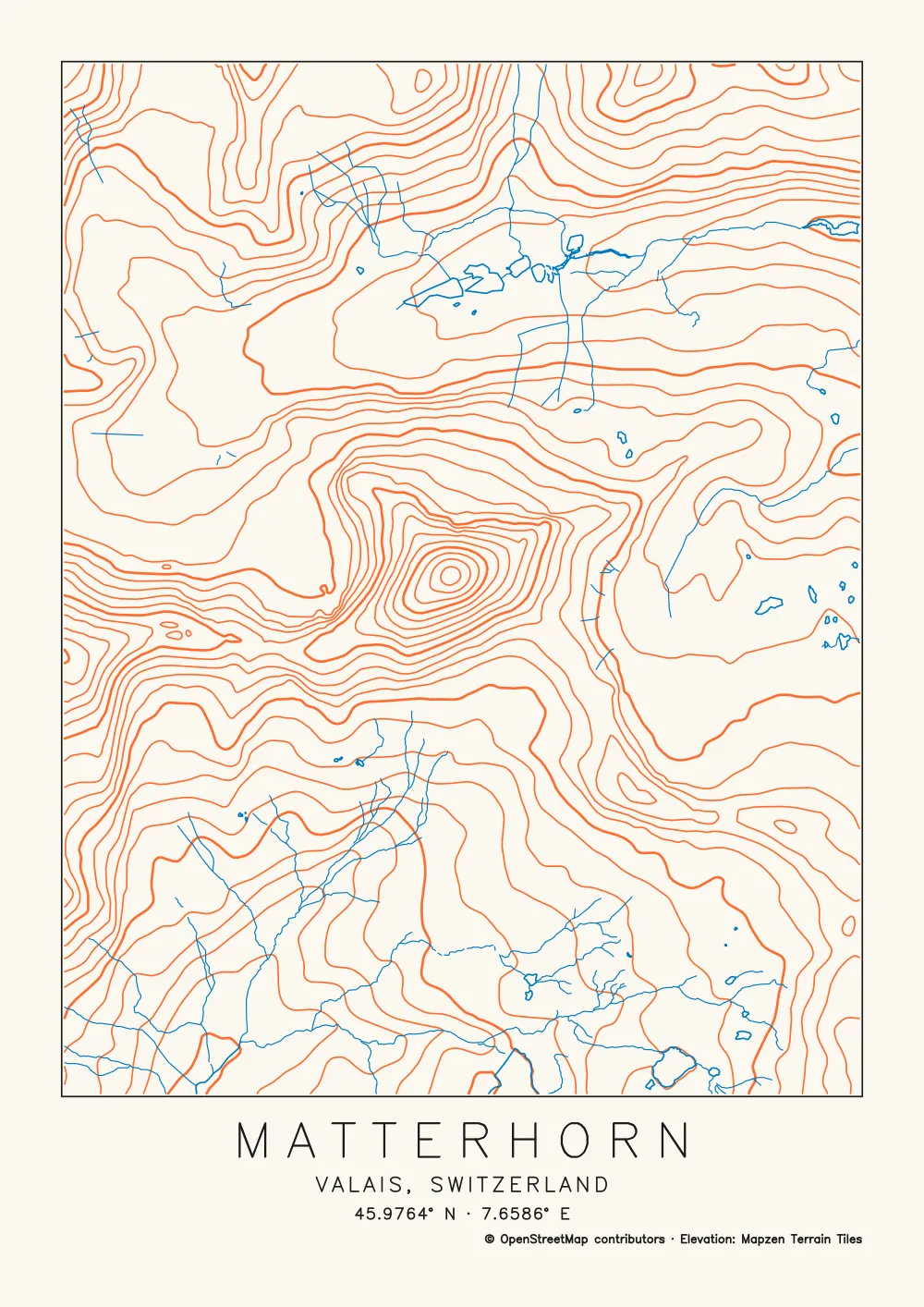
Opens the Map style ready for a place search. Pick a peak, a glacier or a national park and the map switches to the Topographic preset for you. For a town, pick Topographic yourself, or Streets and contours to keep the streets. For a street poster, see the city map poster generator; for stacked profiles, the ridgeline map generator.
- Interval Automatic, or a fixed 1 to 500 m
- Index Every 4th, 5th or 10th contour on its own layer, for a thicker pen
- Files SVG in millimetres, one layer per pen, or a 1-bit PNG at 50 to 1,200 DPI
How to make a topographic map
- Search for the place. Open Map in the editor and type a peak, an island, a valley, a town or coordinates. Or start from the Matterhorn, one of the examples there before you search: it opens on the Topographic preset.
- Check the preset. When the place you pick is a peak, a volcano, a hill, a glacier, a valley, a mountain pass, a mountain range or a national park, the map switches to Topographic by itself, unless you have already chosen a look. For a town, an island or coordinates, pick Topographic yourself. It switches on Rivers, lakes and coast and Contour lines, and switches the roads off. For a hilly town or a trail map, Streets and contours keeps the streets.
- Frame it. The map area takes your paper’s shape. A single peak or an island suits a few kilometres; the Region (25 km radius) and Mountains (50 km) scales take in a whole range.
- Set the contour interval. Automatic picks one from the terrain, the paper and your pen. Or choose 1, 2, 5, 10, 20, 25, 50, 100, 200, 250 or 500 m.
- Choose the index contours. Bold every: Automatic, No bold lines, 4th, 5th or 10th line. The bold lines go on their own layer.
- Smooth the lines. Contour smoothness, from 0 to 2 mm (0.35 mm to start), smooths the terrain before tracing and removes tiny noisy loops.
- Pick the inks. Contours ink and Water ink, orange and blue to start, to match the pens you own.
- Frame, title and credit, then export. Rectangle, Circle or No frame; Title and coordinates in a single-stroke font; keep the Credit line on. Download the SVG, or a PNG for a laser.
Choosing a contour interval
The contour interval is the height between neighbouring lines. Automatic reads the slopes inside your frame and picks a round interval, so that on typical ground the lines sit about 1.2 mm apart on paper, and on the steepest ground no closer than two and a half pen widths, and never under 1 mm. For the Matterhorn on A4 with a 0.35 mm pen, it chose 100 m. Here is the same 90 × 90 mm of that map at three fixed intervals:
-
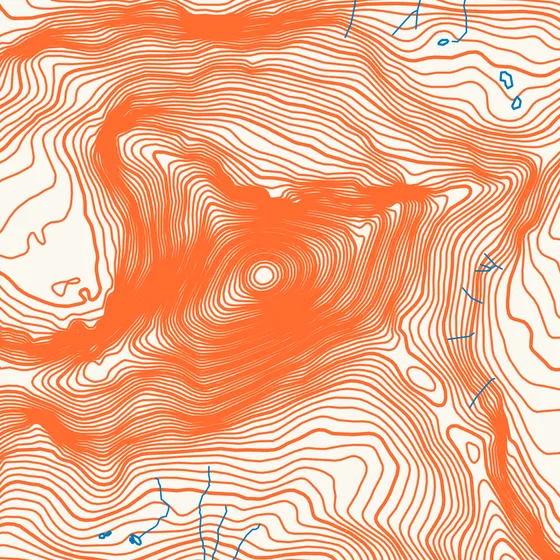 25 m
25 m -
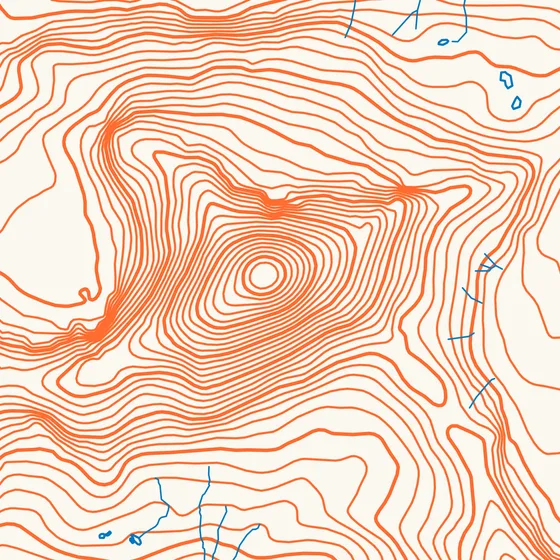 50 m
50 m -
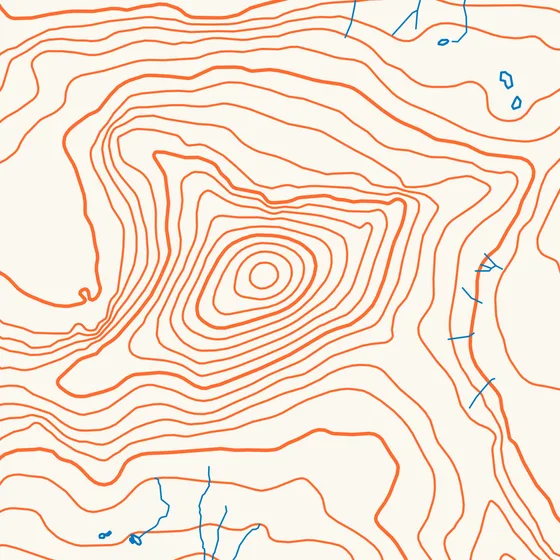 100 m · Automatic’s choice
| Interval | Heights traced | Contour paths | Whole map | Line | Plot time |
|---|---|---|---|---|---|
| 25 m | 96 | 321 | 669 paths | 41 m | about 18 min |
| 50 m | 48 | 162 | 510 paths | 22 m | about 11 min |
| 100 m | 24 | 85 | 433 paths | 13 m | about 8 min |
The whole A4 map, with every 5th line bold. Heights traced counts the contour heights between the lowest (1,959 m) and highest (4,354 m) ground in the frame. Plot times are the tool’s estimates; your plotter’s speed settings change them.
At 25 m the steep faces below the summit merge into solid orange: the lines are closer together than a 0.35 mm pen is wide. When that happens, widen the interval, use a finer pen, or go up a paper size so the same ground spreads over more millimetres. Index contours make a close interval easier to read, because the eye can count in fives. Choose a fixed interval when you want round numbers or want to match a printed map.
Hilly towns: streets and contours
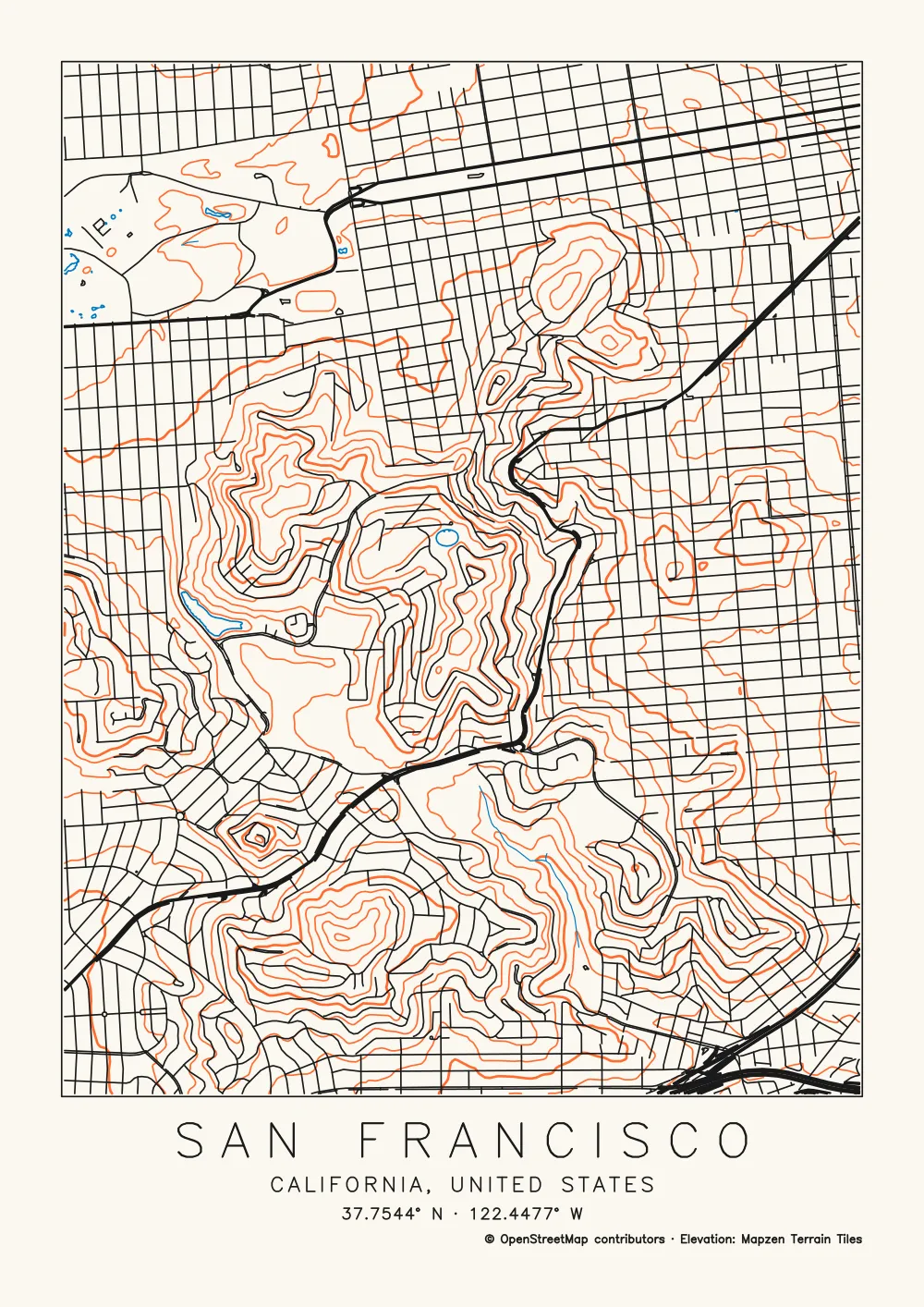
Streets and contours draws the streets in black over contour lines in orange. In central San Francisco the ground in the frame runs from 14 m to 284 m, and Automatic chose a 20 m interval: 85 contour paths under 780 street and road paths.
The hills show through the grid, which is what makes a hilly city poster read. Railways are off in this preset; switch Railways on if you want them. More about scale and street layers is on the city map poster generator page.
What’s in the file
The SVG is in millimetres, strokes only, with every line clipped to the frame. Each kind of feature is its own layer, named the way AxiDraw’s layer control reads them. The Matterhorn map above:
| Layer | Drawn at | Paths |
|---|---|---|
| 1 Contours | 0.35 mm | 66 |
| 2 Bold contours | 0.56 mm | 19 |
| 3 Water | 0.35 mm | 58 |
| 4 Streams | 0.245 mm | 111 |
| 5 Frame and title | 0.35 mm | 179 |
Bold contours are drawn at 1.6 times your pen width and streams at 0.7 times, so the preview shows them heavier and lighter. Plot them with a broader or finer pen, or with the same one.
Where the heights come from
Contours are traced from Mapzen Terrain Tiles on AWS, one worldwide set of elevation tiles built from several open sources. According to the tiles’ data sources page:
- SRTM covers land at 30 m (90 m nominal quality), apart from high latitudes.
- 3DEP covers the United States at 10 m outside Alaska, and 3 m in select areas.
- The United Kingdom is at 2 m over most of the country; Austria and Norway at 10 m; New Zealand at 8 m.
- EU-DEM covers much of Europe at 30 m, and ArcticDEM the land north of 60° at 5 m.
- ETOPO1, at 1 arc-minute, fills in the sea floor.
What that means on paper:
- Sharp summits come out low. The tiles’ resolution and the smoothing Plotcaster applies before tracing both round them off. The highest ground in the Matterhorn frame is 4,354 m; the real summit is 4,478 m. A lower Contour smoothness keeps a little more of the peak.
- Flat cities get few lines. A few metres of height gives little to trace, and Automatic doesn’t go below 2 m.
- Noisy loops come from small bumps in the data. Raise Contour smoothness until they go.
A real place, or a picture?
- A real place: this page, the Map style.
- A heightmap, a Terrarium elevation tile or a photo: Contours traces topographic line art from any image, and reads Terrarium tiles as real heights.
- A scanned or screenshotted topo map: Trace colour keeps the brown contour lines as single strokes. See extract contour lines or roads from a map image.
Plotting and engraving contours
- Pens: plot the orange contours first, then the blue water, then the black title and credit, and tape the paper down between pens. Put the Bold contours layer in a broader pen for the survey-map look. Multi-colour pen plotting and pen plotter map art cover registration and pen order.
- Lasers: contours are long, smooth lines that score well from the SVG, or engrave the PNG at your laser’s DPI. How to make a laser engraved map has the settings.
- Limits: no 3D, no STL and no stacked wooden layers. The output is lines on one sheet.
FAQ
- Why are there no contour lines on my map?
- Contour lines are off in the Streets preset. Switch on Contour lines, or pick Topographic or Streets and contours. A fixed interval bigger than the height range in your frame can give few lines or none, so try Automatic. And a flat city has little height to trace, so it gets few lines whatever you choose.
- Can I get the contour interval in feet?
- No. Intervals are in metres, from 1 m to 500 m, because the elevation data is in metres.
- Can I sell prints of a topographic map?
- Yes, with credit. Keep the Credit line on: it plots "© OpenStreetMap contributors" for the water and "Elevation: Mapzen Terrain Tiles" for the contours. OpenStreetMap asks for its credit on the item, the packaging and at the point of sale (see credit and selling prints). The terrain tiles’ attribution notes list the wording each underlying elevation source asks for, so check the ones that cover your area.
- What is an index contour?
- A contour drawn heavier at a regular count, every 4th, 5th or 10th line, so you can count heights at a glance, as on survey maps. Bold every puts them on their own layer, Bold contours. On Automatic it is every 5th line, or every 4th when the interval starts with 2.5 (25 m or 250 m).
- Is the SVG free?
- Yes. The SVG and the PNG are free, with no account and no watermark. The drawing is made in your browser.
- Can I make a 3D or layered wooden topographic map?
- No. Plotcaster draws lines on one sheet. It doesn’t make 3D models, STL files or stacked layers to cut.
Guides and related tools
- City map poster generator: street map SVG of any place
- Ridgeline map generator: a joy plot of any place
- Pen plotter map art: layers, pens, contour interval and credit
- Contours: topographic line art from any image or heightmap
- Extract contour lines or roads from a map image
- Multi-colour pen plotting
- How to make a laser engraved map