Ridgeline map generator: a joy plot of any place on Earth
Search for a mountain, a volcano or an island, and Plotcaster draws the land as stacked horizontal profiles. Near ridges hide the land behind them, the look of the Unknown Pleasures record sleeve. It uses open elevation data and exports an SVG in millimetres, or a 1-bit PNG for a laser.
Runs in your browser: free, no account, nothing to install.
Opens the Ridgelines style ready for a place search. For contour lines instead, see the topographic map generator; for streets, the city map poster generator.
- Lines 20 to 200 stacked profiles, 70 to start
- Relief 1 to 20 line spacings tall, 6 to start
- Files SVG in millimetres, or a 1-bit PNG at 50 to 1,200 DPI
What a ridgeline map is
A ridgeline map cuts the land into evenly spaced west-to-east profiles and stacks them up the page, the nearest at the bottom. Each profile rises where the ground is high. Hidden lines are removed, so a near ridge hides the land behind it, and the lines read as solid terrain rather than a tangle.
The look comes from a record sleeve. Joy Division’s Unknown Pleasures came out in June 1979 with a cover designed by Peter Saville, based on an image of radio waves from pulsar CP 1919 in The Cambridge Encyclopaedia of Astronomy. The image was first made by radio astronomer Harold Craft at the Arecibo Observatory for his 1970 doctoral dissertation (Wikipedia). Charts drawn this way are often called joy plots or ridgeline plots; here the data is the ground itself.
How to make a ridgeline map
- Search for the place. Open Ridgelines in the editor and search for a mountain, a volcano, an island or coordinates, then frame it. Landscape paper often suits, because the lines run across the page.
- Lines, 20 to 200 (70 to start): how many profiles are stacked.
- Relief height, 1 to 20 line spacings (6 to start): how tall the highest ground stands.
- Smoothness, 0 to 3 mm (0.5 mm to start): calms jagged profiles.
- Flatten the sea, on to start: water is drawn as flat lines instead of showing the sea floor.
- Frame: Rectangle or No frame. Title and coordinates writes the place name under the relief in a single-stroke font; type your own Title to replace it. Keep the Credit line on.
- Export an SVG for a pen plotter, or a PNG for a laser.
Places that work
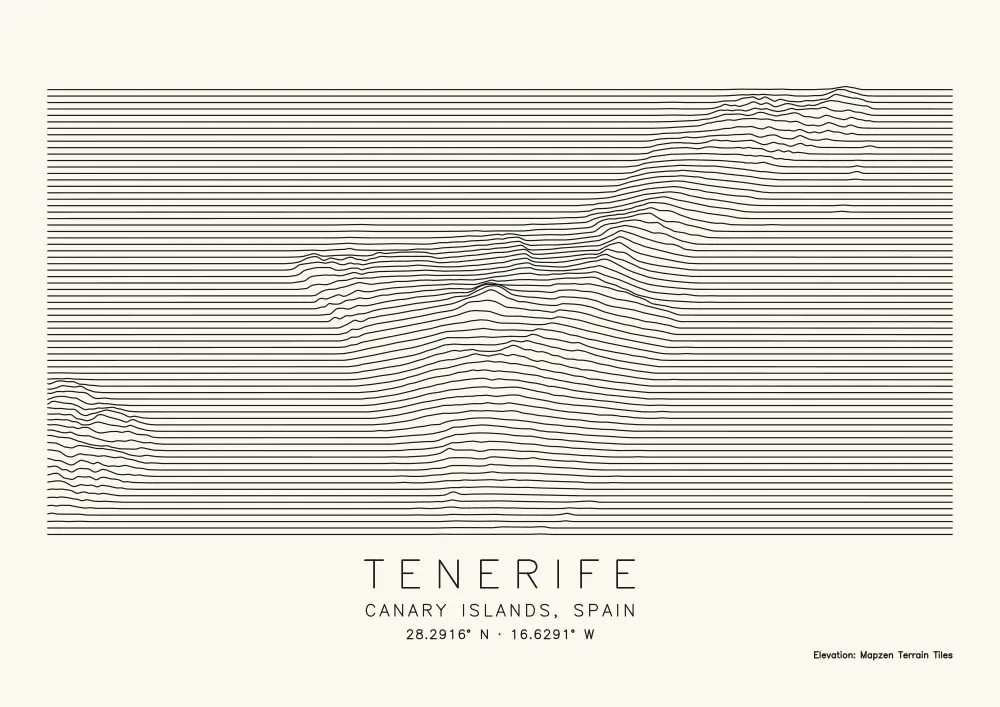
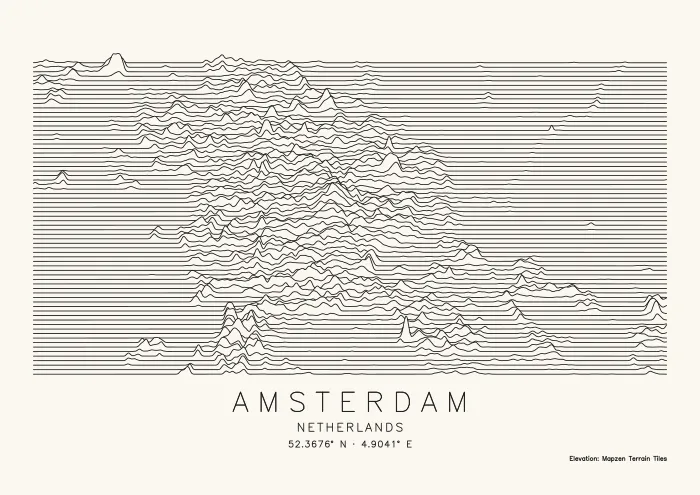
The picture comes from the relief inside your frame. Volcanoes, islands with a coastline and mountain ranges make strong shapes. Plains and flat cities don’t: see the third example.
Lines and relief height
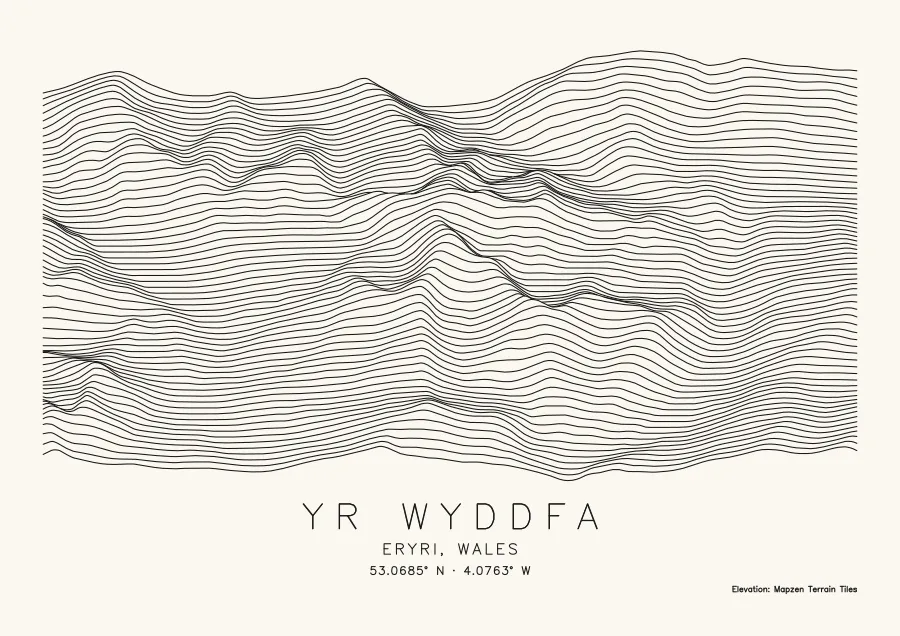
The profiles and the tallest peak share the height of the map: line spacing is the map’s height, less one pen width, divided by Lines plus Relief height. On A4 landscape with a title and 14 mm margins, as in these pictures, the map is 146 mm tall; at the editor’s default 15 mm margins it is 144 mm. Here is Yr Wyddfa at relief height 11, with 40 lines and with 120:
-
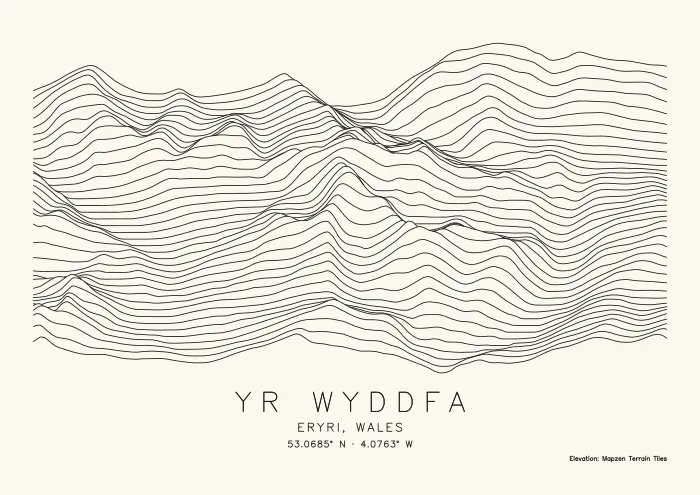 40 lines · 2.85 mm apart
 -
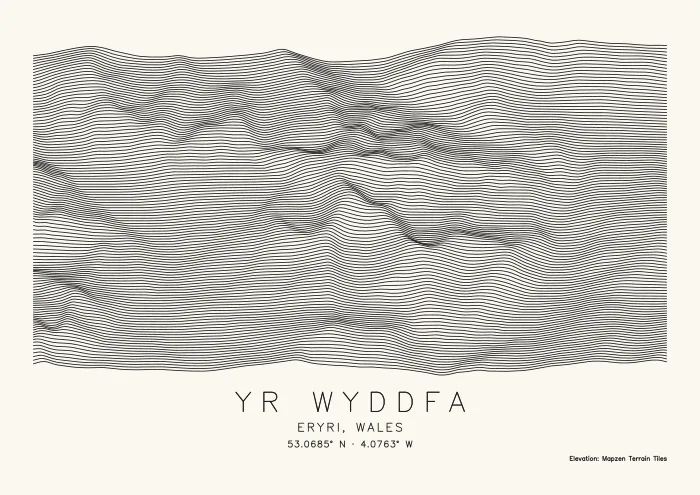 120 lines · 1.11 mm apart
| Lines | Line spacing | Tallest relief | Paths | Line | Plot time |
|---|---|---|---|---|---|
| 40 | 2.85 mm | 31.4 mm | 217 | 12 m | about 5 min |
| 64 | 1.94 mm | 21.3 mm | 201 | 18 m | about 7 min |
| 120 | 1.11 mm | 12.2 mm | 235 | 33 m | about 11 min |
Yr Wyddfa on A4 landscape with 14 mm margins, a 0.35 mm pen, relief height 11, title and credit on. Plot times are the tool’s estimates.
Fewer lines make a bolder print and a quicker plot; more lines show more of the land and take longer. The path count hardly moves, because wherever a ridge hides a profile, that profile breaks into separate pieces. Line length and plot time follow the number of lines. At 120 lines the profiles are 1.1 mm apart, which leaves clear paper beside a 0.35 mm fineliner; a broad marker would start to fill the gaps.
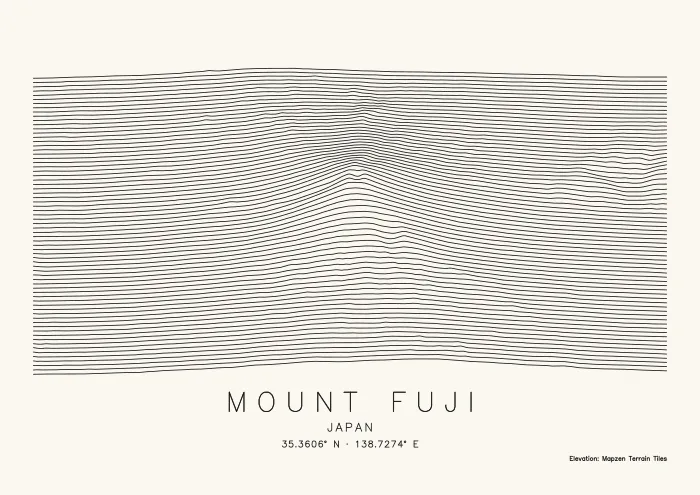
Relief height counts in line spacings, from the lowest ground in the frame (never below sea level when Flatten the sea is on) up to the highest. A lone peak in a wide frame takes all of that for itself, so raise the relief height or frame closer until the land around it shows. Mount Fuji at 70 lines:
-
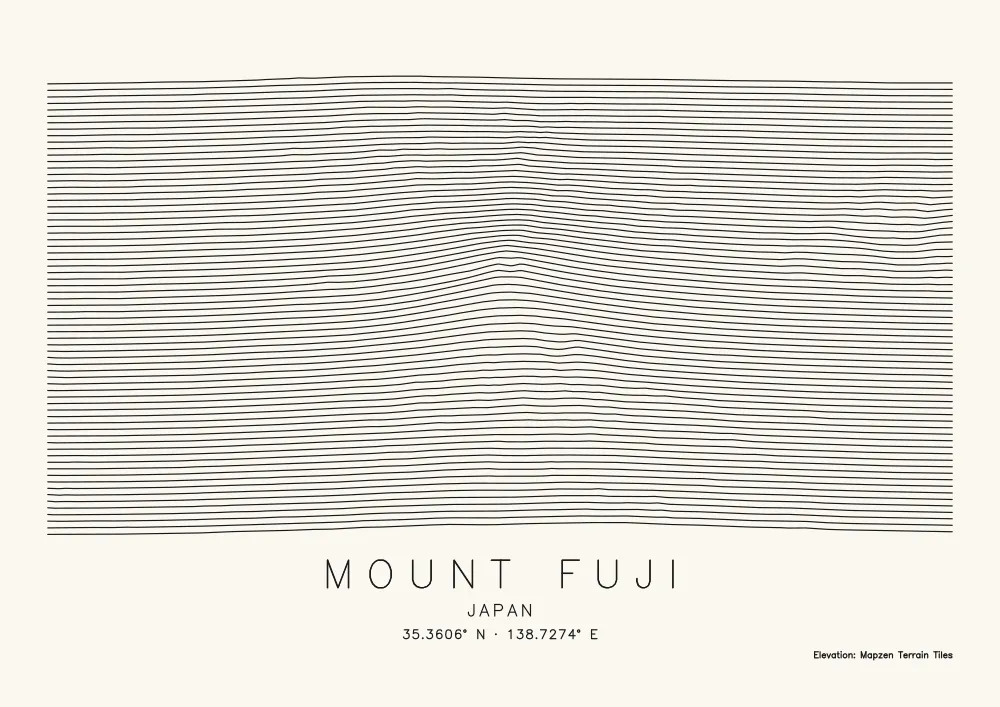 Relief height 6 · peak 11.5 mm tall
 - Relief height 12 · peak 21.3 mm tall
Mount Fuji, 26 km across on A4 landscape with 14 mm margins: 177 paths and about 7 minutes either way. Elevation: Mapzen Terrain Tiles.
Plotting a ridgeline map
- One pen, long strokes. The SVG has one Ridgelines layer, plus Frame and title for the lettering and credit, so the whole relief plots with one pen and few lifts per line.
- Choose the pen for the spacing. The table above gives the spacing for a few line counts; pick a pen well under it.
- The white-on-black album look. The map styles have no invert, so plot with a white gel pen on black paper.
- For a laser, download the PNG at your laser’s DPI and engrave it, or score the SVG lines. The photo to laser engraving converter page explains the DPI and how to import the file into your laser software.
FAQ
- Why is my ridgeline map flat?
- Relief height is shared out between the lowest and the highest ground in the frame, so one tall peak in a wide frame leaves everything around it looking flat: frame closer, or raise Relief height. Flatten the sea treats all ground below sea level as sea, so land below 0 m comes out flat; switch it off to show that land, along with the sea floor. A high Smoothness also irons out small ridges.
- Why does a flat city look noisy?
- Because relief is scaled to the frame. A city with 60 m between its lowest and highest ground still gets the full relief height, so every small bump in the data stands up as a spike, as in the Amsterdam example above. Ridgelines suit places with real relief.
- How many lines should I use?
- Start at 70. Try 40 or fewer for a bold print and a quicker plot, and 100 to 200 for detail on big paper with a fine pen. Keep the line spacing well wider than your pen, so paper shows between the lines.
- Can I sell prints?
- Yes. Keep the Credit line on: it plots "Elevation: Mapzen Terrain Tiles" under the relief. Ridgelines use elevation data only, so there is no OpenStreetMap data in them. The terrain tiles’ attribution notes list the wording each underlying elevation source asks for, so check the ones that cover your area.
- Is this like Peak Map?
- It draws the same kind of picture. Anvaka’s Peak Map makes a ridge line chart of any region on Earth from Mapbox elevation data, and saves what is on screen as a PNG or an SVG. Plotcaster lays the relief out on your paper size in millimetres, adds the title, coordinates and elevation credit in single-stroke letters a pen can draw, and can also write a 1-bit PNG at your laser’s DPI.
- Is it free?
- Yes. There is no account and no watermark, and the drawing is made in your browser.