Free menu icon SVG files
Free menu icon SVG files: three bars, uneven bars, three dots, nine dots, tiles, a list, sliders and a side drawer, bars in a circle and on a button, a pair with a cross, a café menu, a chalkboard, a burger, brush strokes, leafy stems, a pixel menu and a set of nine.
22 designs. Free for personal and commercial use, no sign-up. What you can do with them.
Or choose one below for its PNG, DXF and cutting sizes.
-
 Menu icon of three bars Solid · 3 pieces
-
 Menu icon button with square bars Solid · one piece
-
 Menu icon with bars of three lengths Solid · 3 pieces
-
 Filter menu icon with narrowing bars Solid · 3 pieces
-
 Three dots menu icon, upright Solid · 3 pieces
-
 Three dots menu icon in a circle Solid · 4 pieces
-
 Nine dots menu icon Solid · 9 pieces
-
 Menu icon of four tiles Solid · 4 pieces
-
 List menu icon with bullets Solid · 6 pieces
-
 Settings menu icon with three sliders Solid · 3 pieces
-
 Side drawer menu icon Solid · one piece
-
 Menu icon cut out of a solid circle Solid · one piece
-
 Menu icon and close icon pair Solid · 2 pieces
-
 Café menu icon with a fork and knife Solid · one piece
-
 Café board menu icon Solid · one piece
-
 Burger menu icon in colour Layered · 12 pieces
-
 Brush stroke menu icon Solid · 3 pieces
-
 Pixel menu icon with a pointer Solid · 4 pieces
-
 Leafy menu icon of three stems Solid · 3 pieces
-
 Menu icon tile with a long shadow Layered · 5 pieces
-
 Block menu icon in 3D Layered · 15 pieces
-
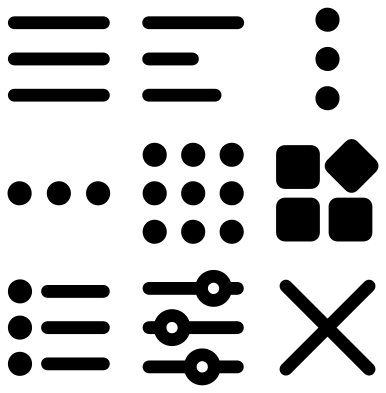 Set of nine menu icons Solid · 35 pieces
Bars, dots and tiles
Three bars have meant a hidden list since the first graphical screens, because they look like the list they hide. What makes a good one is the spacing: here the gap between two bars is about a quarter wider than a bar, so the three stay apart at 16 pixels. The dots keep the same idea: the three dots in the circle have a space between them as wide as a dot.
The plain icons have round or square ends, never both in one icon. Use the round ones beside rounded type and the square ones beside plain block type. All of them stand on one grid, so they can be swapped for one another without moving anything else on the page.
For screens and for tables
On a website, put the SVG inside a real button and give the button a name such as “Menu”, because the picture alone says nothing to a screen reader. The pair of discs holds both states of that button at one size.
The café menu and the chalkboard are for the other kind of menu. Cut the cover from card 150 mm high as the front of a small dinner menu, or the board in white vinyl on a dark counter. The thinnest lines in both are about 2 mm at 100 mm, so keep them over 80 mm.
How to open the files
- Cricut Design Space: choose Upload, pick the SVG, and add it to the canvas. Set the width you want; the shape is already welded.
- Silhouette Studio: Designer Edition and above open the SVG. The free Basic Edition does not, so open the DXF instead.
- LightBurn, xTool Creative Space and Glowforge: import the SVG, then set the layer to cut, score or engrave.
- Inkscape, Illustrator and Affinity: open the SVG. It is a plain filled path, so you can recolour it, add a stroke or combine it with your own work.
- Printing or sublimation: use the PNG, which has a transparent background.
Each design page lists the file’s narrowest part at seven sizes, so you can tell whether it will survive at the size you plan to cut.
Questions
Should I use three bars or three dots?
Three bars open the main list of a site or an app. Three dots open a short list that belongs to one thing, such as a message or a photo. Nine dots or four tiles open a set of apps.
Can the three bars be cut as one piece?
The bars are separate, so they move as a group with transfer tape. If you want a single piece, use the disc or the button, where the bars are holes in one shape.
How do I put my own dishes on the chalkboard?
Leave the lines out: in a design program, break the board apart and delete the inner shapes you do not want. The frame, the divider and the cup are separate outlines, so each can go or stay.
 Cross SVG
 Paw print SVG
 Shamrock SVG
 Anchor SVG
 Compass SVG
 Gear SVG